Make a healing eyes meme from your photo
Add oversized glossy cartoon eyes to one photo for a playful reaction image. AI-created JPEG; eye shapes and facial details may vary from sticker templates.
Start with a photo. Sign in when you’re ready to create.
Go to photo field
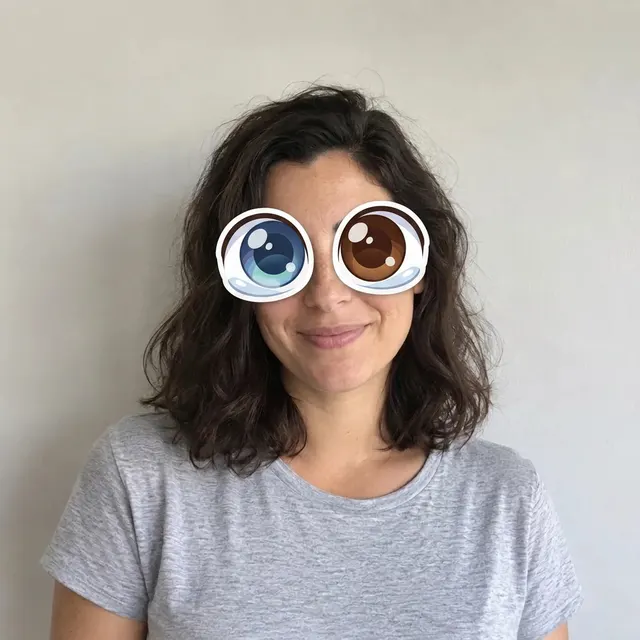
AI example Original → result
Your result may vary.
AI-generated example from an existing reference. Your result will vary.
What to expect
Healing Eyes is the effect name, not a health or therapy claim. Eye colors, shape, placement and other facial details can change; there is no precise sticker-positioning tool or blinking animation.
About Healing Eyes
- You bring
- One adult photo with both eyes clearly visible
- You get
- One reaction-photo JPEG with oversized glossy cartoon eyes
The example overlays large glossy blue and brown illustrated eyes on the otherwise photographic fictional adult portrait.
Compare another direction: Impossible Camera Roll · 2D Cartoon.
Before choosing a reference, learn how to choose a photo for AI art. Match the photo to this effect’s input instructions and check details before saving.
How to create with Healing Eyes.
- 01
Choose your photo
Choose a front-facing or near-front adult photo with both eyes visible. This makes the intended eye placement easier to inspect, but has not been validated across every pose.
- 02
Prepare and create
The selected style supplies the direction. More options lets you add a note and choose square, portrait or landscape. Sign in if needed, check the displayed allowance, then explicitly choose Create.
- 03
Check and download
Check that the cartoon eyes align with the face, and inspect the nose, mouth and surrounding photo before downloading.
Ways to use this style.
- A sweetly absurd reaction image
- A playful avatar from one portrait
- A still response image for a private chat
Common questions.
Will the rest of my photo be pixel-identical?
The instruction aims to change the eyes while retaining the surrounding photograph. It is still an AI edit, so the face, clothing and background may also shift.
How does it differ from a full cartoon?
This keeps a photographic setting with cartoon eyes. The 2D Cartoon style redraws the whole scene; Impossible Camera Roll instead places the subject in several imaginary settings.
What does a generation include?
One generation creates one JPEG image. Photo packs start at $4.99 for 10 generations. Choose square, portrait or landscape. Another version uses another generation. A confirmed failed or blocked creation returns its reserved allowance.
Are my photos public?
Your photos and results are private to your account. They are processed to create and safety-check your image, and are not published in a public gallery. Read our privacy page for service providers and retention details.