Create your toy car sports photo
Turn one adult sports photo into a playful AI picture of you squeezed into a tiny toy car. One JPEG, no animation; faces and details may change.
Start with a photo. Sign in when you’re ready to create.
Go to photo field
AI example Original → result
Your result may vary.
AI-generated example from an existing reference. Your result will vary.
What to expect
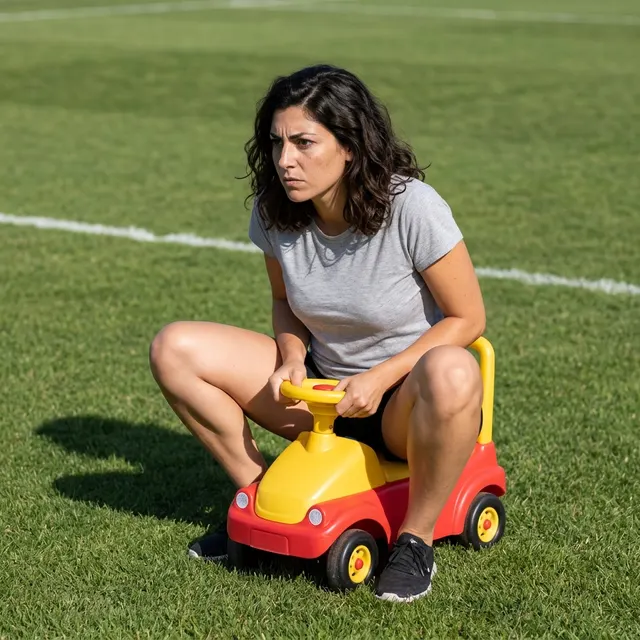
The published example reimagines a fictional adult in a gray T-shirt on grass, with bent knees and a small red-and-yellow car. This is one reviewed example, not a guarantee for arbitrary poses, team outfits or backgrounds. Faces, hands, clothing and car geometry may change. The person stays adult size; this is not a miniature-world effect.
About I'm Onnat Toy Car
- You bring
- One adult photo you have permission to edit; one subject is used
- You get
- One still JPEG of a full-size adult seated in a tiny generic toy car
The existing square example places the fictional adult in a small red-and-yellow car on a field.
Compare another direction: Foot Over Camera · Tiny at 3AM.
Before choosing a reference, learn how to choose a photo for AI art. Match the photo to this effect’s input instructions and check details before saving.
How to create with I'm Onnat Toy Car.
- 01
Choose your photo
Use one adult photo you have permission to edit. The published example starts from a fictional adult portrait; other poses and sports backgrounds may vary.
- 02
Prepare and create
The selected style supplies the direction. More options lets you add a note and choose square, portrait or landscape. Sign in if needed, check the displayed allowance, then explicitly choose Create.
- 03
Check and download
Inspect the face, hands, bent knees, steering wheel, wheels and ground contact before downloading the single still JPEG.
Ways to use this style.
- A playful toy-car sports reaction image
- A serious game-day expression in an absurdly small ride
- A single-image post about feeling too big for the situation
Common questions.
Does this make the I'm Onnat video?
No. This recipe creates one still JPEG. It does not add a song, lip sync, motion or a second slide.
What photo and controls can I use?
Add one adult photo. The recipe supplies the tiny-car scene and aims to retain recognizable features and clothing, without guaranteeing an exact face or sports uniform. More options accepts an optional note and square, portrait or landscape shape. Only the square published example has been reviewed here; other shapes may rearrange the scene.
Will it keep my exact toy car or add a logo?
No exact car or branding is promised. The recipe uses an original generic ride-on car and asks for no added logos or lettering. Check the adult's face, hands, knees, wheels and ground contact before downloading. It creates a JPEG, not a song, animation or physical toy.
What does a generation include?
One generation creates one JPEG image. Photo packs start at $4.99 for 10 generations. Choose square, portrait or landscape. Another version uses another generation. A confirmed failed or blocked creation returns its reserved allowance.
Are my photos public?
Your photos and results are private to your account. They are processed to create and safety-check your image, and are not published in a public gallery. Read our privacy page for service providers and retention details.