Photo to Rubber Stamp Art Comparison
Turn a photo into a photo-inspired and carved-ink stamp-style comparison on warm paper. One AI JPEG artwork; details and likeness vary, no physical stamp included.
Start with a photo. Sign in when you’re ready to create.
Go to photo field
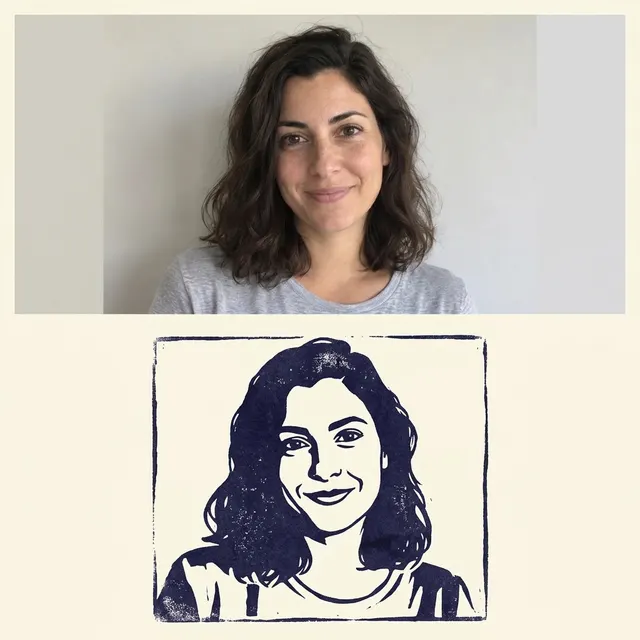
AI example Original → result
Your result may vary.
AI-generated example from an existing reference. Your result will vary.
What to expect
The photographic panel is an AI reinterpretation, not an unchanged copy of the source pixels. Facial details, pose, cropping, background and the stamp outline may vary. This is digital artwork, not a physically carved or delivered rubber stamp, vector file, cutting pattern, editable layers or print-production specification. Only one fictional adult square example has been reviewed; landmarks, pets, other subjects and frames remain unverified.
About Photo to Rubber Stamp Art
- You bring
- One clear photo with one main subject
- You get
- One JPEG containing a photo-inspired panel and an indigo stamp-art panel
The square example places a photographic interpretation of the dark wavy-haired adult in a grey shirt above a simplified dark indigo ink portrait. Broad pale channels define the face and clothing, with dry-ink gaps, slightly broken edges and an irregular rectangular border on warm ivory paper. Both panels retain the front-facing portrait arrangement.
Compare another direction: Folk Art Print · Duotone Print.
Before choosing a reference, learn how to choose a photo for AI art. Match the photo to this effect’s input instructions and check details before saving.
How to create with Photo to Rubber Stamp Art.
- 01
Choose a clear source photo
Upload one photo with a readable main subject and permission to edit. The preset uses one reference; it does not assemble separate images of different people.
- 02
Prepare your two-panel comparison
The style asks for a photo-inspired upper panel and a carved indigo-ink impression below it on ivory paper. More options accepts an optional note and square, portrait or landscape shape. Sign in if needed, review the displayed allowance, then explicitly choose Create.
- 03
Inspect and download the artwork
Compare the subject and viewpoint across both panels. Check the face, stamp border and uninked channels before saving. Both panels are flattened into one JPEG; they are not separate files or an engraving template.
Ways to use this style.
- Explore an ink-stamp interpretation of a personal portrait
- Make a digital before-and-after art comparison for a creative mood board
Common questions.
Will I receive a physical rubber stamp?
No. You receive one digital JPEG showing stamp-inspired ink artwork beside a photo-inspired interpretation. No carving, manufacturing, shipping or physical product is included.
Is the top panel my exact original photo?
No. Both panels are generated from the reference. The photographic interpretation can change face details, crop, pose, clothing or background; compare it with your source before sharing.
Can I use the file directly for engraving?
The JPEG is a flattened artwork rather than a vector or calibrated carving file. Ink gaps, line widths and dimensions are not verified for a manufacturing process.
Can it turn a travel photo into stamp art?
The direction can reinterpret a clear main subject or landmark, but the published example checks only one fictional adult portrait. Other subjects and complicated scenes remain unverified and can lose fine details.
What does a generation include?
One generation creates one JPEG image. Photo packs start at $4.99 for 10 generations. Choose square, portrait or landscape. Another version uses another generation. A confirmed failed or blocked creation returns its reserved allowance.
Are my photos public?
Your photos and results are private to your account. They are processed to create and safety-check your image, and are not published in a public gallery. Read our privacy page for service providers and retention details.