Washing Machine POV Photo Effect
Put your portrait in a playful laundry-room scene framed by a round washing machine drum. Upload one clear adult photo for one AI image; perspective and likeness may vary.
Start with a photo. Sign in when you’re ready to create.
Go to photo field
AI example Original → result
Your result may vary.
AI-generated example from an existing reference. Your result will vary.
What to expect
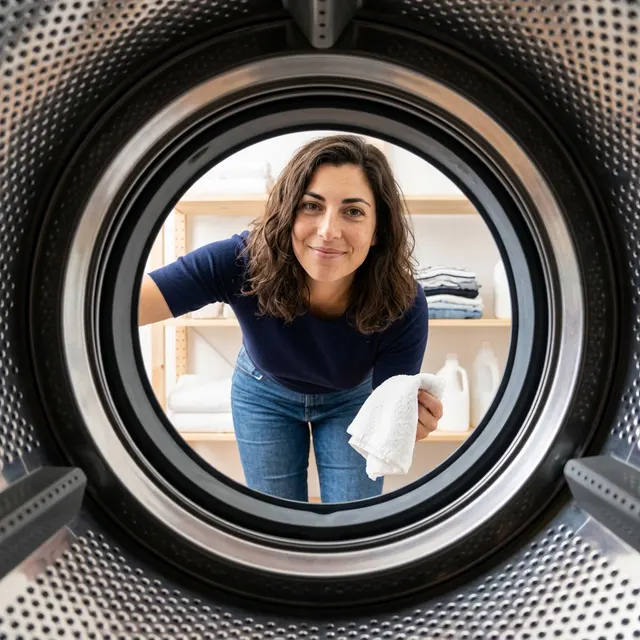
This is an AI-imagined still photograph, not footage from a real appliance. Face, hands, outfit, room and ring geometry can change; the amount of visible body and framing are not locked. Only one square adult example is shown.
About Washing Machine POV
- You bring
- One clear solo adult portrait
- You get
- One laundry-room portrait JPEG framed by a round washing-machine drum
The example shows a fictional adult in a navy shirt and jeans leaning toward the camera from a bright laundry room, holding a white towel beyond a perforated steel drum and round black door seal.
Compare another direction: Foot Over Camera · Tiny at 3AM.
Before choosing a reference, learn how to choose a photo for AI art. Match the photo to this effect’s input instructions and check details before saving.
How to create with Washing Machine POV.
- 01
Choose your photo
Choose one clear solo adult photo with the face visible. An ordinary portrait is enough; the recipe imagines the washer opening, clothing and laundry room.
- 02
Prepare and create
The selected style supplies the viewpoint. More options lets you add a note and choose square, portrait or landscape. Sign in if needed, review the displayed allowance, then explicitly choose Create.
- 03
Check and download
Check the face, hand, towel and circular steel opening before saving your JPEG.
Ways to use this style.
- A playful laundry-day profile photo
- A circular-portal portrait for a personal post
- A wide-angle lifestyle mood-board image
Common questions.
Do I need a photo taken in a laundry room?
No. Upload one ordinary clear adult portrait. The recipe adds the imagined room and circular washer viewpoint, with the person outside the appliance.
Will it keep my exact face, clothes and room?
It uses the photo as a reference, but likeness, clothing, hands and background can be reinterpreted. The published example uses a fictional adult, a plain navy shirt and jeans.
How is this different from Foot Over Camera or Tiny at 3AM?
Foot Over Camera exaggerates a foreground sneaker from ground level. Tiny at 3AM shrinks the adult against bedside objects. This effect keeps the adult outside the machine and uses the circular steel opening as the foreground frame.
Does it make an animated spin or several frames?
No. It creates one still JPEG. It does not generate a spinning appliance, a video or a sequence of matched frames.
What does a generation include?
One generation creates one JPEG image. Photo packs start at $4.99 for 10 generations. Choose square, portrait or landscape. Another version uses another generation. A confirmed failed or blocked creation returns its reserved allowance.
Are my photos public?
Your photos and results are private to your account. They are processed to create and safety-check your image, and are not published in a public gallery. Read our privacy page for service providers and retention details.