Create a western portrait from your photo
Turn one adult photo into a cinematic western portrait with a cowboy hat, denim jacket and red-rock sunset. An AI still image; likeness and details may vary.
Start with a photo. Sign in when you’re ready to create.
Go to photo field
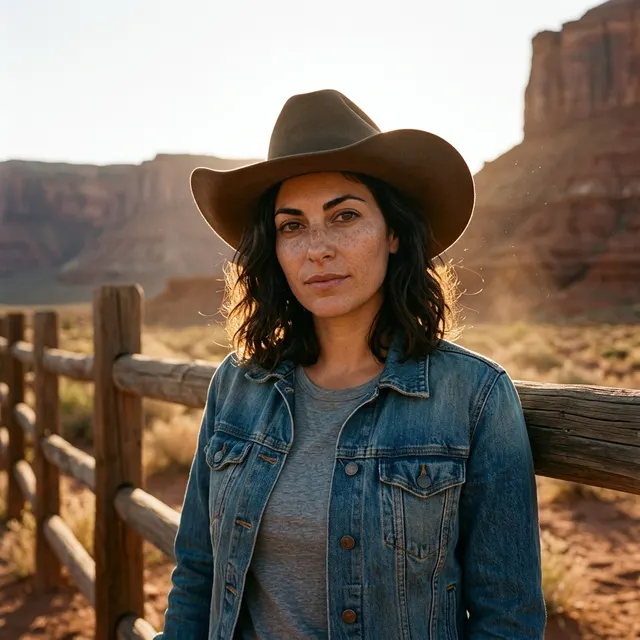
AI example Original → result
Your result may vary.
AI-generated example from an existing reference. Your result will vary.
What to expect
This is an imagined costume portrait, not proof of a real trip, a specific movie scene or a named character. Facial likeness, age appearance, hairstyle, body outline, hat, clothing and scenery can change. There is no exact-location or wardrobe selector, horse/action scene or animation. Only the square fictional-adult example has been checked; other inputs and shapes remain unverified.
About Western Portrait
- You bring
- One clear solo adult photo with permission to edit
- You get
- One still JPEG of an adult in western clothing beside a fence in a red-rock desert
The square example shows the fictional adult wearing a brown cowboy hat and blue denim jacket over a gray shirt. A rustic timber fence, red-rock mesas and warm backlight frame the portrait, with the eyes still visible below the brim.
Compare another direction: Rainy Cafe Portrait · Fall Forest Portrait.
Before choosing a reference, learn how to choose a photo for AI art. Match the photo to this effect’s input instructions and check details before saving.
How to create with Western Portrait.
- 01
Choose one adult portrait
Upload a clear solo adult photo with readable eyes and facial features. The task uses one person, not a group, horse or additional reference photo.
- 02
Prepare the western scene
This direction supplies a plain cowboy hat, denim jacket, wooden fence and warm desert light. More options accepts an optional note and square, portrait or landscape shape. Sign in if needed, check the displayed allowance, then explicitly choose Create.
- 03
Review and save your still image
Check the face, hat brim, hair, jacket seams and fence before downloading the JPEG. A different version needs another generation; saving does not create a video or recreate a real location.
Ways to use this style.
- A cinematic western-themed profile portrait
- A personal costume-party invitation image
- A sunset desert character mood board
Common questions.
Do I need a cowboy hat or a desert photo?
No. Start with one clear adult portrait. The preset generates the hat, clothing and desert setting, so the original outfit and background do not stay exact.
Can I choose an exact movie character or location?
No. The direction creates an original western mood, without a named character or exact-place control. A note may guide details but does not guarantee a specific costume, scene or likeness.
How does this differ from Rainy Cafe or Fall Forest?
Rainy Cafe uses an indoor window and cup; Fall Forest uses autumn woodland and cozy clothing. Western Portrait moves the person into a red-rock desert with a cowboy hat and denim jacket.
Will it add weapons, a horse or movement?
The preset is one person beside a fence and asks for no guns, badges or horses. It produces one static JPEG, with no riding, action sequence or video.
What does a generation include?
One generation creates one JPEG image. Photo packs start at $4.99 for 10 generations. Choose square, portrait or landscape. Another version uses another generation. A confirmed failed or blocked creation returns its reserved allowance.
Are my photos public?
Your photos and results are private to your account. They are processed to create and safety-check your image, and are not published in a public gallery. Read our privacy page for service providers and retention details.