Cinematic Contact Sheet from One Photo
Explore nine cinematic framings in one consistent scene from a single photo. One AI contact-sheet JPEG; artistic likeness, angles and scene details may vary.
Start with a photo. Sign in when you’re ready to create.
Go to photo field
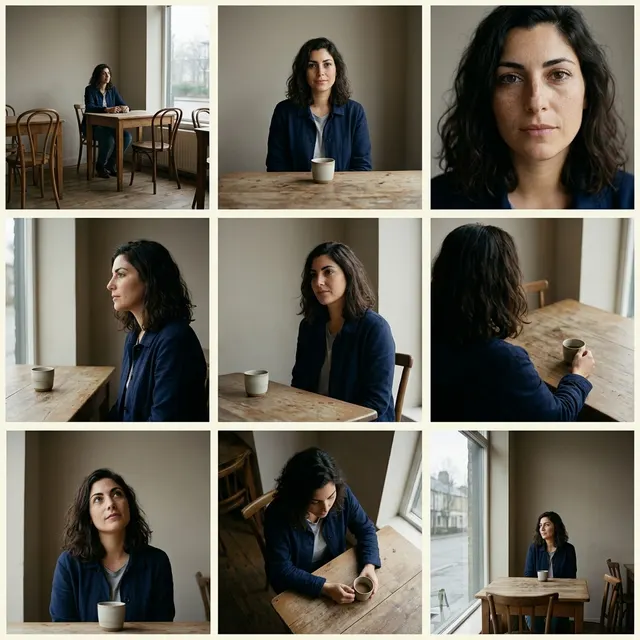
AI example Original → result
Your result may vary.
AI-generated example from an existing reference. Your result will vary.
What to expect
This is an AI shot study, not nine real camera exposures or an optical reconstruction of the original photograph. Facial likeness, expressions, hands, table geometry, cup position and scene details can vary across panels. It does not provide nine separate downloads, editable layers, an animated storyboard, exact lenses or guaranteed identity consistency. Only one fictional adult square example has been reviewed; other subjects and frames remain unverified.
About Cinematic Contact Sheet
- You bring
- One clear photo of one fully clothed adult
- You get
- One JPEG contact sheet with nine cinematic framings in a 3 by 3 grid
The square example contains exactly nine panels with pale ivory gutters. The same dark wavy-haired adult wears a navy jacket over a grey shirt at a wooden cafe table. A wide establishing view, medium view, face close-up, profile, three-quarter view, rear over-the-shoulder view, low angle, high angle and window-side wide view vary the framing. Expressions, hands and small table or cup details are generated anew.
Compare another direction: Rainy Cafe Portrait · Clone Team Portrait.
Before choosing a reference, learn how to choose a photo for AI art. Match the photo to this effect’s input instructions and check details before saving.
How to create with Cinematic Contact Sheet.
- 01
Choose one adult reference
Upload one clear solo adult portrait you have permission to edit. It supplies a visual reference for all nine panels rather than nine different people.
- 02
Prepare the contact sheet
The style asks for a consistent navy jacket, wooden cafe table, cup and soft window light across a 3 by 3 grid. More options accepts an optional note and square, portrait or landscape shape. Sign in if needed, review the displayed allowance, then explicitly choose Create.
- 03
Review all nine panels
Check the grid count, face, hands, outfit, cup, table and lighting across the framings before downloading. The whole sheet is one flattened JPEG; the tool does not export nine separate files or animate transitions.
Ways to use this style.
- Explore shot sizes for a fictional cafe character scene
- Compare portrait framings on a personal previsualization mood board
Common questions.
Do I receive nine separate images?
No. The result is one JPEG containing a 3 by 3 contact sheet. The panels are flattened together; separate panel downloads or editable layers are not provided.
Will all nine shots have exactly the same face and props?
The prompt asks for the same adult, outfit and cafe scene throughout, but the model redraws each view. Likeness, expressions, hands, table edges and cup placement can vary; inspect every panel.
Is this a video or an exact camera simulation?
No. It is a still visual shot study. It does not animate camera motion, reproduce a real shoot, preserve exact optics or provide lens settings.
How is this different from Rainy Cafe or Clone Team?
Rainy Cafe makes one portrait scene. Clone Team places several imagined versions of one person within a composition. This contact sheet studies nine separate framings of one adult in the same cafe setting.
What does a generation include?
One generation creates one JPEG image. Photo packs start at $4.99 for 10 generations. Choose square, portrait or landscape. Another version uses another generation. A confirmed failed or blocked creation returns its reserved allowance.
Are my photos public?
Your photos and results are private to your account. They are processed to create and safety-check your image, and are not published in a public gallery. Read our privacy page for service providers and retention details.