AI Clone Team Photo from One Picture
Make a playful clone team photo from one adult picture: seven versions of you together in one studio scene, with different outfits. AI details can vary.
Start with a photo. Sign in when you’re ready to create.
Go to photo field
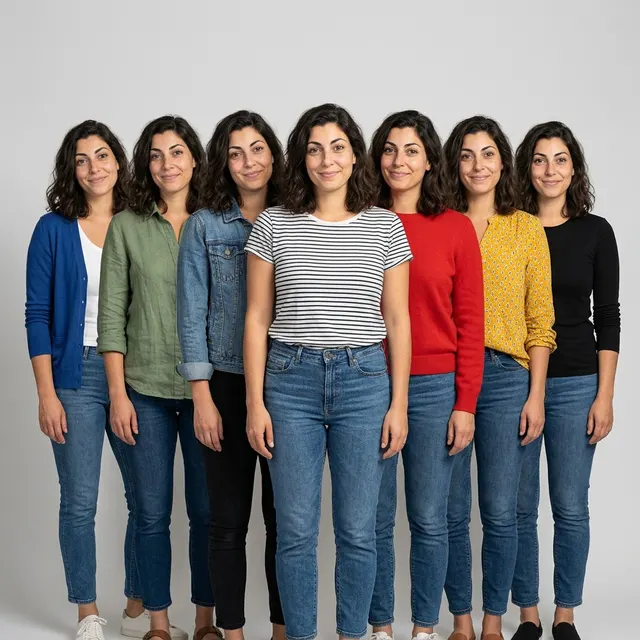
AI example Original → result
Your result may vary.
AI-generated example from an existing reference. Your result will vary.
What to expect
Seven is the requested composition, not a guaranteed count. Faces, body proportions, hands, clothing and framing can vary or contain AI errors. The example reaches the ankles and clips parts of the shoes; it does not establish consistent head-to-mid-thigh framing. This is one staged digital image, not seven separate files, an editable outfit system or evidence of a real gathering. Only one fictional adult square example has been reviewed; other adults, poses and shapes remain unverified.
About Clone Team Portrait
- You bring
- One clear photo of a single adult
- You get
- One JPEG group portrait aiming for seven versions of the same adult in different casual outfits
The example places seven dark-haired versions of one fictional adult against a light grey studio background. The central striped-shirt figure stands slightly forward, with blue, green and denim outfits to the left and red, yellow and black outfits to the right. All seven faces are visible; the bottom crop cuts off parts of the shoes.
Compare another direction: City Giant Portrait · Black and White Studio.
Before choosing a reference, learn how to choose a photo for AI art. Match the photo to this effect’s input instructions and check details before saving.
How to create with Clone Team Portrait.
- 01
Choose one adult photo
Choose one clear photo of a single adult with an unobstructed face and readable hair, pose and clothing. The reviewed example uses one fictional adult; a group photo or separate photos of different people are not the intended input.
- 02
Prepare and create
The selected style supplies the seven-clone group direction. More options lets you add a note and choose square, portrait or landscape. Sign in if needed, review the displayed allowance, then explicitly choose Create.
- 03
Count and inspect the result
Check the number of faces and bodies, their likeness, hands, clothing and crop before downloading the JPEG.
Ways to use this style.
- A playful personal clone-team portrait
- An outfit-variation image to keep or share
- A studio-style visual for a personal moodboard
Common questions.
How many people should be in my input photo?
Use one existing photo of a single adult with a clear face. This recipe creates artistic repetitions of that subject; it is not intended to combine different people from separate uploads.
Will there always be exactly seven identical faces?
No. The prompt asks for seven versions, and the published example has seven visible faces. Count, likeness, proportions, hands and clothing details can vary, so inspect the result before using it.
Can I choose all seven outfits or download separate portraits?
No separate outfit editor or multi-file export is included. You can add an optional note, but exact outfits are not guaranteed. The result is one JPEG containing the group scene.
How does it differ from City Giant Portrait or Black and White Studio?
City Giant Portrait changes a solo subject into a giant urban scene. Black and White Studio keeps a single studio portrait. Clone Team Portrait instead repeats one adult into a playful group wearing varied outfits.
What does a generation include?
One generation creates one JPEG image. Photo packs start at $4.99 for 10 generations. Choose square, portrait or landscape. Another version uses another generation. A confirmed failed or blocked creation returns its reserved allowance.
Are my photos public?
Your photos and results are private to your account. They are processed to create and safety-check your image, and are not published in a public gallery. Read our privacy page for service providers and retention details.