Create a double exposure portrait from your photo
Blend one adult portrait with a forest landscape inside the silhouette. Create a still AI double exposure image with a clear face; details and likeness may vary.
Start with a photo. Sign in when you’re ready to create.
Go to photo field
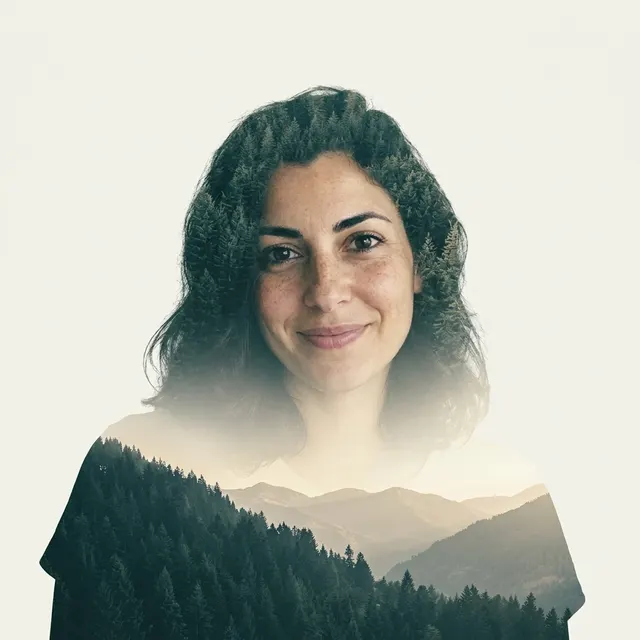
AI example Original → result
Your result may vary.
AI-generated example from an existing reference. Your result will vary.
What to expect
This is a generated still-image blend, not a camera double-exposure file, layered PSD, exact cutout or verified real landscape. Facial likeness, hairstyle, pose, scenery and the amount of blending may change. The preset has no second-photo landscape upload or mask editor. Only the square fictional-adult example has been checked; other inputs and shapes remain unverified.
About Double Exposure Portrait
- You bring
- One clear solo adult portrait with permission to edit
- You get
- One still JPEG blending an adult portrait silhouette with a forest and mountain landscape
The square example keeps the fictional adult’s face readable on a warm off-white background. Dark evergreen trees appear through the hair and lower shoulder silhouette, with pale distant mountain ridges and a soft cream fade below the face.
Compare another direction: Black and White Studio · Fall Forest Portrait.
Before choosing a reference, learn how to choose a photo for AI art. Match the photo to this effect’s input instructions and check details before saving.
How to create with Double Exposure Portrait.
- 01
Choose one clear portrait
Upload one solo adult photo with the face and shoulder outline visible. The task uses one portrait reference, not separate portrait and scenery uploads.
- 02
Prepare the landscape blend
The selected recipe supplies evergreen forest, distant mountain ridges, muted teal and warm cream tones. More options accepts an optional note and square, portrait or landscape shape. Sign in if needed, check the displayed allowance, then explicitly choose Create.
- 03
Check the face and silhouette
Review eyes, mouth, hair edges, forest placement and the fade across the shoulders before downloading the JPEG. A new version needs another generation; the saved image does not contain editable exposure layers.
Ways to use this style.
- A nature-themed personal profile portrait
- A digital fine-art portrait poster
- A forest-and-mountain mood-board image
Common questions.
Can I upload my own landscape as a second photo?
This recipe accepts one adult photo. It generates the forest and mountain scene; it does not offer a second reference upload, exact location matching or a landscape replacement layer.
Can I control the exact outline or keep every facial detail?
No. A clear solo portrait helps, and an optional note can guide the result, but there is no mask or opacity editor and generated facial detail can vary.
How does this differ from Fall Forest Portrait?
Fall Forest places an adult outdoors in autumn scenery. Double Exposure blends evergreen forest and mountains mostly inside the adult’s outline on a light background.
Can I export separate layers or an animation?
No. The output is one flattened still JPEG. It does not include editable exposure layers, moving trees, video or a print-production file.
What does a generation include?
One generation creates one JPEG image. Photo packs start at $4.99 for 10 generations. Choose square, portrait or landscape. Another version uses another generation. A confirmed failed or blocked creation returns its reserved allowance.
Are my photos public?
Your photos and results are private to your account. They are processed to create and safety-check your image, and are not published in a public gallery. Read our privacy page for service providers and retention details.