Game Loading Screen Portrait from Your Photo
Turn one adult photo into bold illustrated game-style key art with a neon coastal sunset. Get one AI JPEG; details vary. Not an official game asset or animation.
Start with a photo. Sign in when you’re ready to create.
Go to photo field
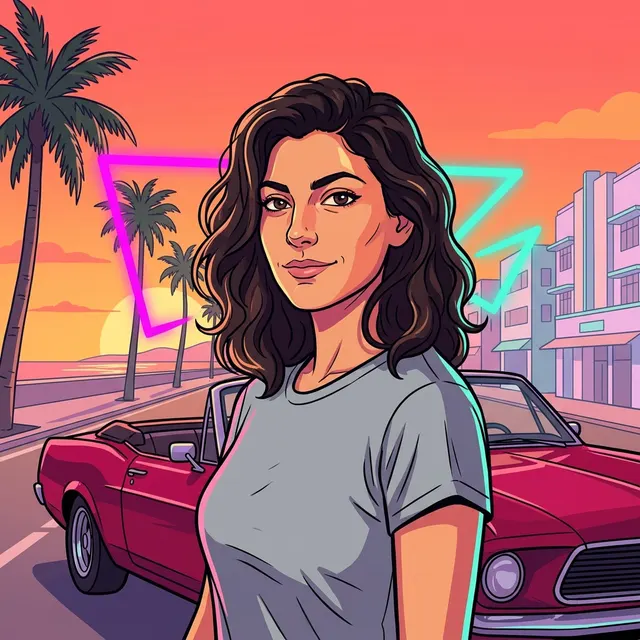
AI example Original → result
Your result may vary.
AI-generated example from an existing reference. Your result will vary.
What to expect
This is an original AI illustration, not an official franchise asset, game screenshot or usable game interface. It redraws the whole person and scene, so likeness, pose, hair, clothing and car geometry may vary. It does not include lettering, a loading bar, animation or editable layers. Only one fictional adult square example has been reviewed; other subjects and frames remain unverified.
About Game Loading Screen Portrait
- You bring
- One clear photo of one fully clothed adult
- You get
- One original illustrated game-key-art portrait JPEG
The fictional adult is drawn with dark wavy hair, a grey T-shirt, bold contours and flat shaded colour planes. A cherry-red convertible, coastal palms, pastel buildings, an orange-pink sunset and abstract turquoise/magenta neon shapes fill the scene. The face and pose are stylized rather than copied pixel for pixel.
Compare another direction: City Giant Portrait · Comic Book.
Before choosing a reference, learn how to choose a photo for AI art. Match the photo to this effect’s input instructions and check details before saving.
How to create with Game Loading Screen Portrait.
- 01
Choose one adult photo
Choose one clear adult portrait you have permission to edit. Show the face and hairstyle; you do not need a car or tropical setting in your input.
- 02
Prepare your illustrated scene
The style supplies the outlined character, coastal sunset and generic red convertible. More options lets you add a note and choose square, portrait or landscape. Sign in if needed, review the displayed allowance, then explicitly choose Create.
- 03
Check and download the still
Inspect the face, body, car and scene edges before saving. The result is one flattened JPEG illustration, not a playable scene, animation, layered file or official game asset.
Ways to use this style.
- Make a fictional character-style profile portrait
- Explore a neon coastal illustration for a personal mood board
Common questions.
Is this an official game screenshot or asset?
No. It creates an original fictional key-art illustration. It does not provide franchise characters, logos, an official game screenshot or an endorsed asset.
Does the loading screen move?
No. The output is one JPEG still. There is no animation, playable scene, loading indicator or game UI.
Will I look exactly like my photo?
The model uses your photo as a visual reference, then redraws the person and scene. Facial likeness, pose, clothes and fine details can change; review the entire result before sharing.
What does a generation include?
One generation creates one JPEG image. Photo packs start at $4.99 for 10 generations. Choose square, portrait or landscape. Another version uses another generation. A confirmed failed or blocked creation returns its reserved allowance.
Are my photos public?
Your photos and results are private to your account. They are processed to create and safety-check your image, and are not published in a public gallery. Read our privacy page for service providers and retention details.