City Giant Portrait Photo Effect
Turn one clear adult photo into a surreal city portrait with skyscraper scale and tiny street details. Create one AI image; likeness and perspective may vary.
Start with a photo. Sign in when you’re ready to create.
Go to photo field
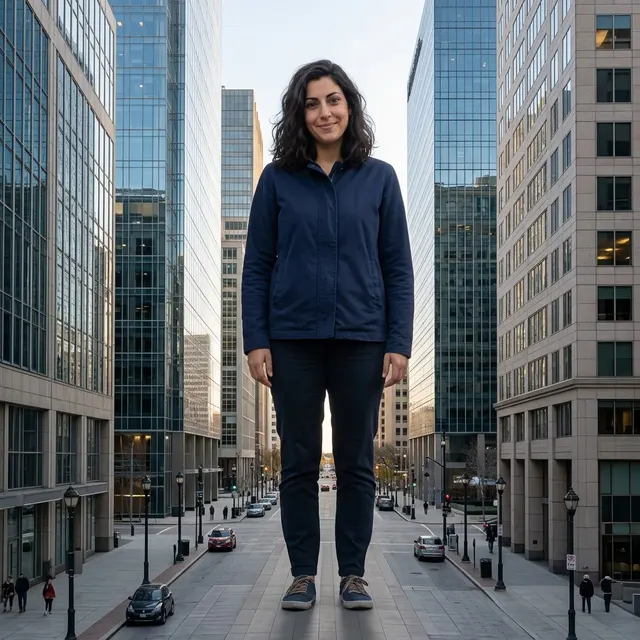
AI example Original → result
Your result may vary.
AI-generated example from an existing reference. Your result will vary.
What to expect
Scale, anatomy, outfit, street geometry and likeness can change. No exact height, recognizable city or building is promised. The sample is one fictional adult in one square still; it is not footage of a real giant, an animated action or a sequence of matched views.
About City Giant Portrait
- You bring
- One clear solo adult portrait
- You get
- One surreal city-giant portrait JPEG with small street details showing scale
The example shows a fictional adult in navy clothing standing full length between glass office buildings, with much smaller cars, street lamps and pedestrians establishing the scale.
Compare another direction: Tiny at 3AM · I'm Onnat Toy Car · Clone Team Portrait · Game Loading Screen Portrait.
Before choosing a reference, learn how to choose a photo for AI art. Match the photo to this effect’s input instructions and check details before saving.
How to create with City Giant Portrait.
- 01
Choose your photo
Use one clear solo adult photo with a visible face. An ordinary portrait is enough; the recipe imagines the full-body clothing, large scale and city setting.
- 02
Prepare and create
The selected style supplies the scale and city direction. More options lets you add a note and choose square, portrait or landscape. Sign in if needed, review the displayed allowance, then explicitly choose Create.
- 03
Check and download
Inspect the face, hands, feet, building perspective and contact shadows before saving your JPEG.
Ways to use this style.
- A playful larger-than-life profile portrait
- An imagined city-scale scene for a personal post
- A surreal architecture-and-human mood board
Common questions.
Do I need a full-body photo taken in a city?
No. Choose one ordinary clear adult photo with the face visible. The model invents the body, clothing and imagined city around that reference; exact outfit and pose are not locked.
Can I choose an exact city, height or landmark?
The recipe uses a generic modern city. An optional note can guide the scene, but it does not provide a map, precise height control or a guarantee of a real landmark.
How are Tiny at 3AM and Onnat different?
Tiny at 3AM shrinks the adult against oversized bedside objects. Onnat keeps the adult full size and makes a car tiny. City Giant enlarges the person relative to buildings and ordinary street details.
Does it make a walking giant video?
No. It returns one still JPEG. Walking, moving traffic, camera motion and matched video frames are outside this image recipe.
What does a generation include?
One generation creates one JPEG image. Photo packs start at $4.99 for 10 generations. Choose square, portrait or landscape. Another version uses another generation. A confirmed failed or blocked creation returns its reserved allowance.
Are my photos public?
Your photos and results are private to your account. They are processed to create and safety-check your image, and are not published in a public gallery. Read our privacy page for service providers and retention details.