AI Christmas Fireplace Portrait from One Photo
Make a cozy holiday fireplace portrait from one photo, with a knit sweater and warm tree lights. One AI JPEG still; likeness and details may vary.
Start with a photo. Sign in when you’re ready to create.
Go to photo field
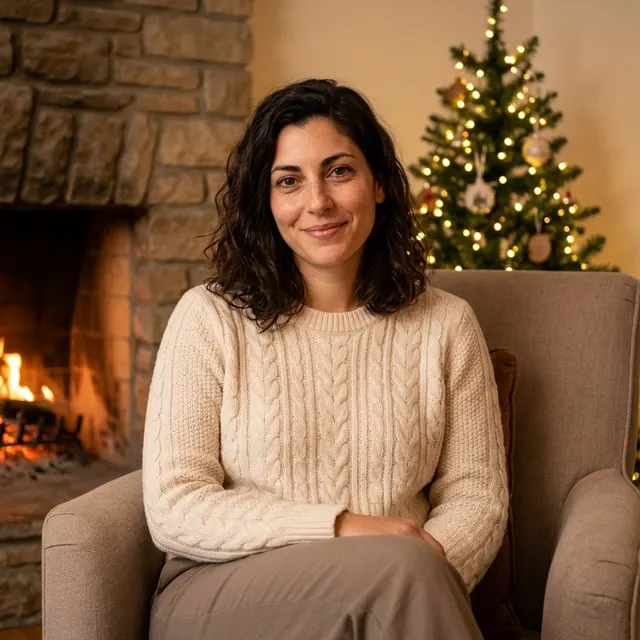
AI example Original → result
Your result may vary.
AI-generated example from an existing reference. Your result will vary.
What to expect
This is an imagined seasonal AI portrait, not a photograph of a real visit or an identity-preserving retouch. Facial details, hair, expression, pose, clothes and room geometry can vary. It does not create animation, separate layers, physical greeting cards or group portraits. Only the fictional adult square example has been reviewed; other subjects and frames remain unverified.
About Holiday Fireplace Portrait
- You bring
- One clear photo of one fully clothed adult
- You get
- One still JPEG of a cozy holiday portrait beside a fireplace
The square example shows the fictional adult seated in a beige armchair, facing the camera in a cream cable-knit sweater and taupe trousers. A stone fireplace with a small warm fire sits to the left, while a softly focused evergreen tree with warm white lights appears behind the chair on the right. The model has changed the pose and expression.
Compare another direction: Snow Globe Portrait · Fall Forest Portrait.
Before choosing a reference, learn how to choose a photo for AI art. Match the photo to this effect’s input instructions and check details before saving.
How to create with Holiday Fireplace Portrait.
- 01
Choose one adult photo
Upload one well-lit solo adult portrait you have permission to edit. A readable face and hairstyle give the model a useful reference; it does not combine separate people.
- 02
Prepare the holiday setting
The style supplies a cream cable-knit sweater, comfortable chair, warm fireplace and tree lights. More options accepts an optional note and square, portrait or landscape shape. Sign in if needed, review the displayed allowance, then explicitly choose Create.
- 03
Inspect and save your portrait
Check the face, hands, knit texture, clothing and the separation from the fireplace before downloading. The file is one flattened JPEG; a new variation needs another generation.
Ways to use this style.
- Make a personal seasonal profile picture
- Create a digital portrait to share in a holiday message
Common questions.
Do I need a fireplace in my input photo?
No. Start with one clear adult photo. The recipe imagines the chair, sweater, fireplace and decorated tree around your visual reference.
Can it include my whole family?
This preset is designed for one adult from one photo. It does not combine people or guarantee a usable group portrait.
Will my face and clothing stay exactly the same?
No. It aims for a recognizable adult likeness while generating a new pose, sweater and room. Fine facial details, hands, hair and knit patterns may change; inspect the whole image before sharing.
Does it make a video or a printed Christmas card?
No. You receive one digital JPEG still. There is no moving fire, sound, physical print, card delivery or editable card layout.
What does a generation include?
One generation creates one JPEG image. Photo packs start at $4.99 for 10 generations. Choose square, portrait or landscape. Another version uses another generation. A confirmed failed or blocked creation returns its reserved allowance.
Are my photos public?
Your photos and results are private to your account. They are processed to create and safety-check your image, and are not published in a public gallery. Read our privacy page for service providers and retention details.