Turn your photo into a snow globe portrait
Create a still snow globe portrait from one adult photo, with a miniature winter scene and warm lights. One AI image; likeness and small details can vary.
Start with a photo. Sign in when you’re ready to create.
Go to photo field
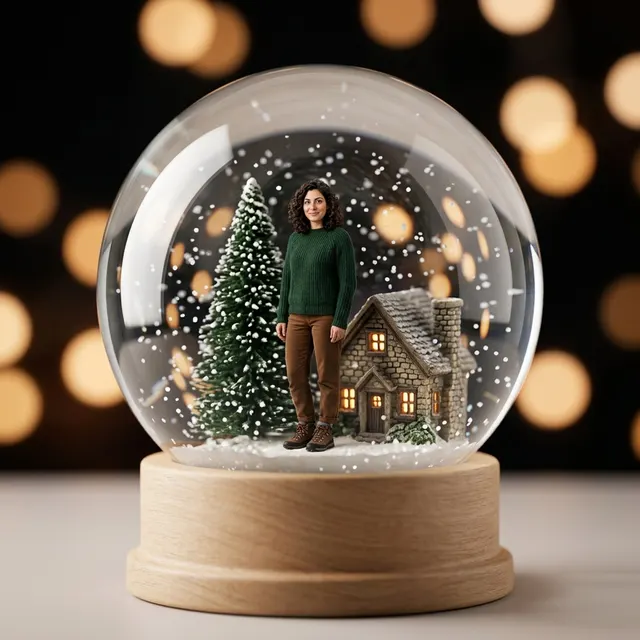
AI example Original → result
Your result may vary.
AI-generated example from an existing reference. Your result will vary.
What to expect
One flattened still AI image, not animated snowfall, a 3D model, an editable ornament design or a physical product. The face is small and can change; clothing, scale, glass reflections, snow and cottage details may vary. Exact lettering or engraving is not offered. Only the square fictional-adult example has been checked; other inputs and shapes remain unverified.
About Snow Globe Portrait
- You bring
- One clear solo adult photo with permission to edit
- You get
- One still JPEG of a miniature adult inside a glass snow globe on a wooden base
The square example shows a fictional adult in a green sweater, brown trousers and boots inside a clear globe on an unlettered wooden base. A snowy evergreen and warmly lit stone cottage sit beside the figure, with white snow specks inside and golden bokeh outside.
Compare another direction: Fall Forest Portrait · Paper Scrapbook Portrait · Holiday Fireplace Portrait.
Before choosing a reference, learn how to choose a photo for AI art. Match the photo to this effect’s input instructions and check details before saving.
How to create with Snow Globe Portrait.
- 01
Choose one adult portrait
Upload one clear solo adult photo. A readable face helps when the person becomes small inside the globe; group photos and multiple reference inputs are not part of this recipe.
- 02
Prepare your winter scene
This direction supplies the glass globe, cozy clothing, snow, small evergreen tree and cottage. More options accepts an optional note and square, portrait or landscape shape. Sign in if needed, check the displayed allowance, then explicitly choose Create.
- 03
Review the miniature and save
Check the small face, hands, feet, glass edges and snowy scene before downloading your JPEG. A different version requires another generation; downloading does not produce a physical snow globe.
Ways to use this style.
- A winter profile picture or digital greeting
- A miniature keepsake image for a personal memory post
- A cozy holiday mood-board portrait
Common questions.
Will the snow move or can I order a physical globe?
No. The result is one static JPEG. This tool does not animate the flakes, make a video, manufacture an object or provide a 3D print file.
Do I need a full-body winter photo?
No. A clear solo adult portrait is enough to start. The model invents the miniature body, clothing and scene, so it cannot promise exact proportions, outfit or likeness.
Can I add a name to the wooden base?
The preset uses an unlettered base and has no engraving or exact-text control. It is designed as a winter portrait image rather than a personalized product order.
How does this differ from Fall Forest or Paper Scrapbook?
Fall Forest keeps a human-scale outdoor autumn portrait. Paper Scrapbook places a photo-like print on paper. Snow Globe makes the adult a small figure inside an imagined glass keepsake.
What does a generation include?
One generation creates one JPEG image. Photo packs start at $4.99 for 10 generations. Choose square, portrait or landscape. Another version uses another generation. A confirmed failed or blocked creation returns its reserved allowance.
Are my photos public?
Your photos and results are private to your account. They are processed to create and safety-check your image, and are not published in a public gallery. Read our privacy page for service providers and retention details.