Pet as Human Photo from Your Pet Picture
Imagine your pet as an adult human companion beside them in one AI photo. Add one clear pet picture; fur colours and expression inspire the human character.
Start with a photo. Sign in when you’re ready to create.
Go to photo field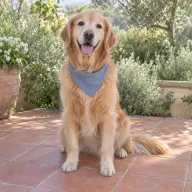
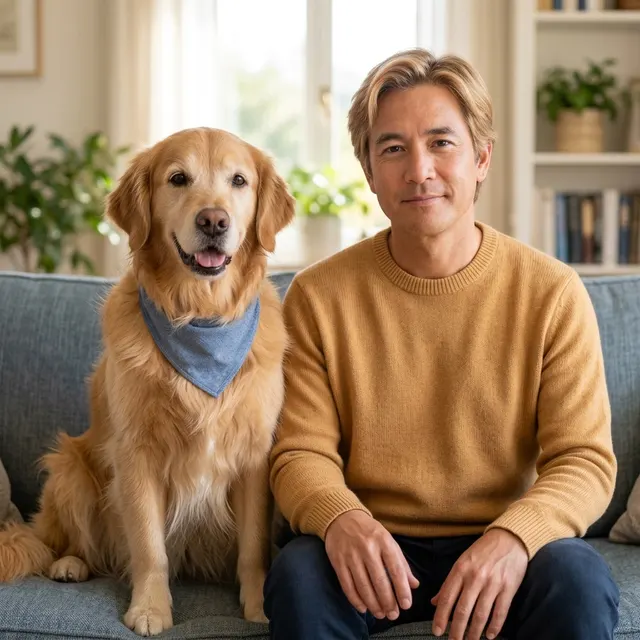
AI example Original → result
Your result may vary.
AI-generated example from an existing reference. Your result will vary.
What to expect
The human companion is an invented artistic interpretation, not the actual owner or a true human identity of the animal. Hair, eye colour, clothing, pet markings, anatomy and expressions can change. The published example keeps a blue bandana on a golden retriever and interprets its golden coat as sandy hair and a mustard sweater. This is one digital still, not a hybrid body, video, separate portraits or editable layers. Only one fictional dog square sample has been reviewed; cats, other pets and shapes remain unverified.
About Pet as Human
- You bring
- One clear photo of a single pet
- You get
- One JPEG of the pet beside an imagined adult human companion in a shared scene
The example places a fictional golden retriever with a blue bandana on the left of a grey sofa and a sandy-haired fictional adult in a mustard knit sweater on the right. Both faces are clear in one warm, window-lit room, with plants and shelves behind them.
Compare another direction: Pet Halloween Costume · Pet Astronaut Portrait · Pet Sticker Sheet.
Before choosing a reference, learn how to choose a photo for AI art. Match the photo to this effect’s input instructions and check details before saving.
How to create with Pet as Human.
- 01
Choose one pet photo
Choose one clear photo of a single pet with its face, eyes, ears and coat markings visible. The reviewed example uses a fictional golden retriever; no human photo or second upload is needed.
- 02
Prepare and create
The selected style supplies the pet-and-human companion direction. More options lets you add a note and choose square, portrait or landscape. Sign in if needed, review the displayed allowance, then explicitly choose Create.
- 03
Check both subjects
Inspect the pet markings and anatomy, the fictional human face and hands, and the shared scene before downloading the JPEG.
Ways to use this style.
- An amusing pet-and-human comparison portrait
- A personal digital pet keepsake
- A playful companion image to keep or share
Common questions.
What kind of photo should I use?
Use one clear photo of a single pet with visible eyes, ears, face and coat markings. The published example is a fictional golden retriever; cats and other pets have not been tested for this recipe.
Do I need to upload a human photo too?
No. The model invents an adult human companion from the pet photo. Coat colours and expression inspire the character; it does not identify or recreate the owner.
Will the animal and human match exactly?
No. Matching colours, markings and mood is an artistic aim. The pet can be redrawn and the human face, hair, eyes, clothes and hands can vary. Check both subjects before keeping the result.
How is it different from Pet Halloween or Pet Astronaut?
Those recipes restyle the animal in a costume or space scene. Pet as Human keeps an animal beside a separate imagined adult person in one shared portrait. It returns one JPEG, not separate images or a talking-animal video.
What does a generation include?
One generation creates one JPEG image. Photo packs start at $4.99 for 10 generations. Choose square, portrait or landscape. Another version uses another generation. A confirmed failed or blocked creation returns its reserved allowance.
Are my photos public?
Your photos and results are private to your account. They are processed to create and safety-check your image, and are not published in a public gallery. Read our privacy page for service providers and retention details.