Day of the Dead Pet Photo from Your Picture
Create one Dia de Muertos pet remembrance photo on a warm marigold path. One AI still image, not a video; fur details and likeness may vary.
Start with a photo. Sign in when you’re ready to create.
Go to photo field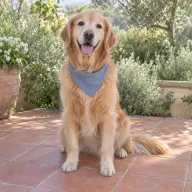
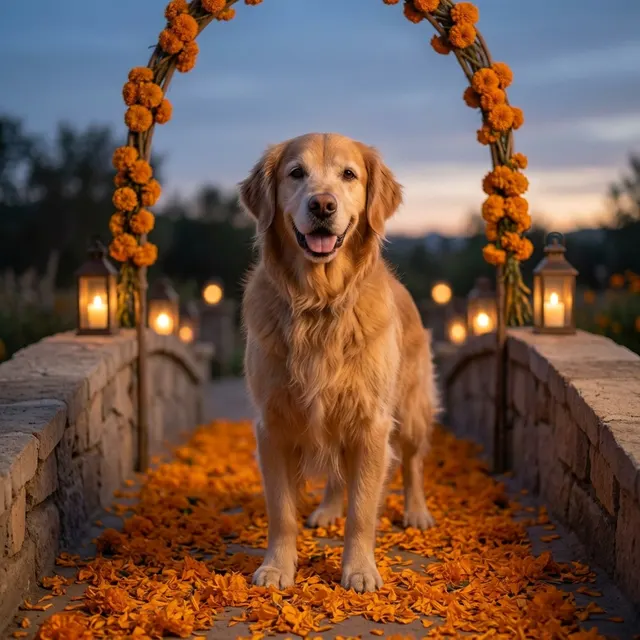
AI example Original → result
Your result may vary.
AI-generated example from an existing reference. Your result will vary.
What to expect
Fur patterns, facial likeness, body proportions, paws and flower details can change. The published example is one fictional golden retriever in a square image; other pets and shapes have not been reviewed. This is a symbolic AI remembrance scene, not evidence of a real event, supernatural contact, an animation or a physical print.
About Pet Marigold Memorial
- You bring
- One clear photo of a single pet
- You get
- One Dia de Muertos-inspired pet remembrance JPEG on an imagined marigold path
The example shows a fictional golden retriever standing on a stone bridge covered with orange marigold petals, under a flower arch with lanterns along the stone sides and a softly lit dusk sky.
Compare another direction: Pet Halloween Costume · Watercolor.
Before choosing a reference, learn how to choose a photo for AI art. Match the photo to this effect’s input instructions and check details before saving.
How to create with Pet Marigold Memorial.
- 01
Choose your pet photo
Choose one clear photo of a single pet with the face, ears and coat markings visible. A full-body photo can guide the proportions; the recipe imagines the flower path and surrounding scene.
- 02
Prepare and create
The selected style supplies the marigold-path direction. More options lets you add a note and choose square, portrait or landscape. Sign in if needed, review the displayed allowance, then explicitly choose Create.
- 03
Check and download
Inspect the face, coat markings, legs, paws and flower-path details before saving your JPEG.
Ways to use this style.
- A personal pet remembrance image to keep or share
- A digital image to place beside a pet ofrenda
- A quiet flower-path keepsake without costume styling
Common questions.
What kind of pet photo should I use?
Use one clear photo of one pet with the face, ears and markings visible. A full-body view may help with proportions, but the flower bridge is imagined. A sharp older photo is fine; the model cannot recover missing details exactly.
Does this create a running pet or a Day of the Dead video?
No. This recipe returns one still JPEG. It does not animate the pet, add sound or make a sequence of video frames.
Will the pet look exactly like the photo?
The photo guides the species and recognizable features, but markings, expression, body and paws may be reinterpreted. Inspect the full image before sharing it as a remembrance.
Is this Halloween styling or a real ofrenda photo?
It is a calm, Dia de Muertos-inspired flower-path scene, with no costume, skeleton characters or text requested. The published scene is AI-created; it is not documentation of an actual altar or an assertion about spiritual events. Pet Halloween is the separate costume-and-pumpkin option.
What does a generation include?
One generation creates one JPEG image. Photo packs start at $4.99 for 10 generations. Choose square, portrait or landscape. Another version uses another generation. A confirmed failed or blocked creation returns its reserved allowance.
Are my photos public?
Your photos and results are private to your account. They are processed to create and safety-check your image, and are not published in a public gallery. Read our privacy page for service providers and retention details.