Photo Doodle Effect with White Hand-Drawn Accents
Add playful white doodles, small stars and a drawn crown around your photo subject. Upload one clear picture for an AI photo with gel-pen accents; details may vary.
Start with a photo. Sign in when you’re ready to create.
Go to photo field
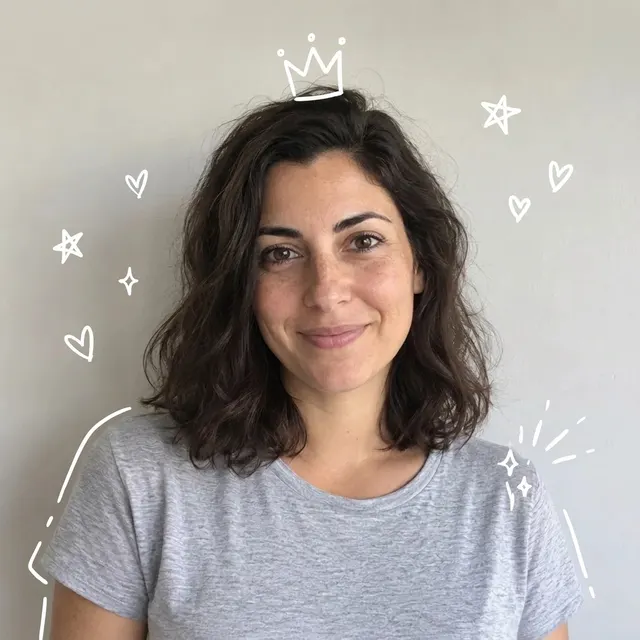
AI example Original → result
Your result may vary.
AI-generated example from an existing reference. Your result will vary.
What to expect
This is an AI restyle, not a non-destructive drawing overlay. Face, clothing, background and crop can change; exact pixels and likeness are not guaranteed. Decoration shapes, count, thickness and placement vary, and a line may overlap hair or clothing. The reviewed square example has a prominent crown and shoulder outline. One fictional adult square sample has been checked; other subjects and shapes remain unverified. The output is a flattened JPEG without editable pen layers or a brush tool.
About Photo Doodle
- You bring
- One clear photo with space around the main subject
- You get
- One photographic JPEG with white hand-drawn decorations around the subject
The example keeps a photographic dark-haired fictional adult in a grey T-shirt against a light wall. White hearts and stars surround the head, a three-point crown sits above the hair, and broken white contour lines follow the shoulders. The face remains unobscured.
Compare another direction: Paper Scrapbook Portrait · Photo × Geometry.
Before choosing a reference, learn how to choose a photo for AI art. Match the photo to this effect’s input instructions and check details before saving.
How to create with Photo Doodle.
- 01
Choose a clear photograph
Choose one clear photo with a visible main subject and some open background for the white lines. The reviewed example uses a fictional adult in a grey T-shirt against a plain wall.
- 02
Prepare and create
The selected style supplies the white doodle direction. More options lets you add a note and choose square, portrait or landscape. Sign in if needed, review the displayed allowance, then explicitly choose Create.
- 03
Check the photo and marks
Inspect the face, clothing and background for changes, then check the crown, stars and broken outline before downloading the JPEG.
Ways to use this style.
- A playful portrait for a personal diary
- An informal photo to share with friends
- A decorated profile picture with a photographic face
Common questions.
What kind of photo should I use?
Use a clear photograph with a visible main subject and some uncluttered background. The published sample uses one fictional adult; other subjects have not been checked for this recipe.
Does it preserve every pixel of my photo?
No. The AI generates the whole image, including the photograph and white marks. Facial details, clothing, framing and background may change; this is not a manual layer editor.
Can I move the doodles or export layers?
No. Optional notes can guide the result, but there are no pen controls, exact-position guarantees or editable layers. Download one flattened JPEG.
How does it differ from Scrapbook or Geometry Poster?
Photo Doodle keeps one photographic image with white decorative marks. Scrapbook arranges a print on decorated paper; Geometry Poster pairs a photograph with a simplified shape composition. This recipe does not promise either layout.
What does a generation include?
One generation creates one JPEG image. Photo packs start at $4.99 for 10 generations. Choose square, portrait or landscape. Another version uses another generation. A confirmed failed or blocked creation returns its reserved allowance.
Are my photos public?
Your photos and results are private to your account. They are processed to create and safety-check your image, and are not published in a public gallery. Read our privacy page for service providers and retention details.