Turn your photo into a geometric collage poster
Create one AI photo-and-geometry poster from your picture. Pair a photo-like view with a simple geometric reinterpretation. Digital JPEG; faces and details may change.
Start with a photo. Sign in when you’re ready to create.
Go to photo field
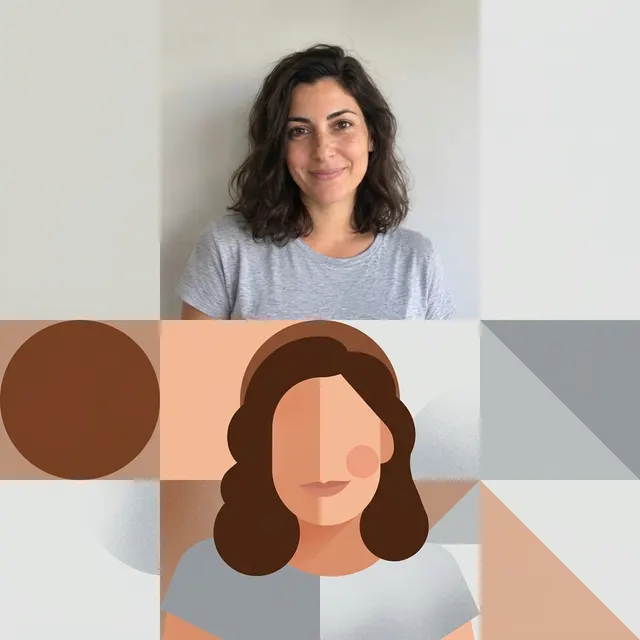
AI example Original → result
Your result may vary.
AI-generated example from an existing reference. Your result will vary.
What to expect
The lower section deliberately simplifies facial and background detail. Section proportions and shapes can vary; this is a flattened JPEG, not vector artwork, an editable layout or an exact-size print file.
About Photo × Geometry
- You bring
- One reference photo with a recognizable main subject
- You get
- One JPEG pairing a photo-like upper view with a geometric interpretation below
The example pairs a photographic portrait above with broad circles, rectangles and simplified facial shapes below.
Compare another direction: Paper Scrapbook Portrait · Pop Art · Disco Mirror Portrait · Photo Doodle.
Before choosing a reference, learn how to choose a photo for AI art. Match the photo to this effect’s input instructions and check details before saving.
How to create with Photo × Geometry.
- 01
Choose your photo
Choose one photo with a clear silhouette and simple spatial relationships. The published example uses the fictional adult portrait.
- 02
Prepare and create
The selected style supplies the direction. More options lets you add a note and choose square, portrait or landscape. Sign in if needed, check the displayed allowance, then explicitly choose Create.
- 03
Check and download
Check that the upper and lower subjects correspond, that broad shapes remain readable, and that no unwanted text appears before downloading.
Ways to use this style.
- A digital photo-and-shape poster
- A visual comparison of a portrait and its silhouette
- A restrained geometric mood-board image
Common questions.
Can I edit individual shapes or export SVG?
No. The model creates the whole design as one JPEG. Notes can guide the direction, but there is no shape editor or vector export.
How does it differ from Pop Art or Scrapbook?
Pop Art redraws the image with contrasting color and halftones. Scrapbook places a photographic print on decorated paper; this poster compares photo-like and geometric versions in two sections.
What does a generation include?
One generation creates one JPEG image. Photo packs start at $4.99 for 10 generations. Choose square, portrait or landscape. Another version uses another generation. A confirmed failed or blocked creation returns its reserved allowance.
Are my photos public?
Your photos and results are private to your account. They are processed to create and safety-check your image, and are not published in a public gallery. Read our privacy page for service providers and retention details.