AI Underwater Portrait from Your Photo
Turn one adult photo into a dreamy underwater-style portrait with soft blue light, floating hair and bubbles. One digital AI image; facial details may vary.
Start with a photo. Sign in when you’re ready to create.
Go to photo field
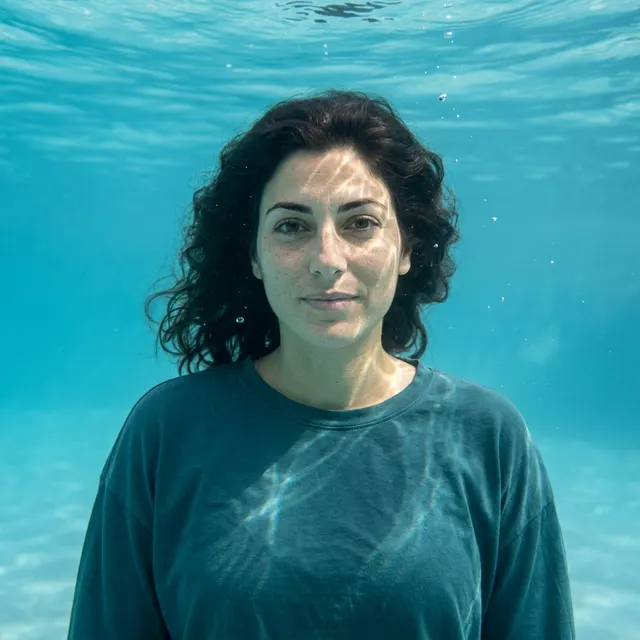
AI example Original → result
Your result may vary.
AI-generated example from an existing reference. Your result will vary.
What to expect
Facial details, skin tone, hair, clothing and lighting can change. The published example is an imagined chest-up scene, not evidence of a real underwater shoot or physical accuracy. It returns one still JPEG, without video, editable layers or a guaranteed exact likeness. Only one fictional adult square example has been reviewed; other adults, poses and image shapes remain unverified.
About Dreamy Underwater Portrait
- You bring
- One clear photo of a single adult with an unobstructed face
- You get
- One JPEG underwater-style portrait with drifting hair, blue-turquoise light and small bubbles
The example shows one dark-haired fictional adult in a loose opaque dark-teal crew-neck top, with hair drifting to the side in clear turquoise water. Small bubbles rise near the face, a rippled surface sits above, and bright water-light patterns cross the forehead, cheek and shirt.
Compare another direction: Rainy Cafe Portrait · Double Exposure Portrait.
Before choosing a reference, learn how to choose a photo for AI art. Match the photo to this effect’s input instructions and check details before saving.
How to create with Dreamy Underwater Portrait.
- 01
Choose your adult photo
Choose one clear photo of a single adult with a visible face and readable hair. The reviewed example uses a fictional adult; a calm expression and uncluttered portrait are useful starting points.
- 02
Prepare and create
The selected style supplies the calm underwater direction and covered clothing. More options lets you add a note and choose square, portrait or landscape. Sign in if needed, review the displayed allowance, then explicitly choose Create.
- 03
Inspect and download
Check the face, hair, clothing, water lighting and crop before saving the JPEG.
Ways to use this style.
- A dreamy personal profile portrait
- An imagined aquatic scene to keep or share
- A blue-light portrait for a personal moodboard
Common questions.
What kind of photo should I use?
Use one clear photo of a single adult with the face unobstructed and the hair visible. The published sample is a fictional adult; group photos and other subject types have not been tested for this recipe.
Do I need to take a photo underwater?
No. Start with an ordinary photo. The model imagines the water, hair movement, bubbles, lighting and covered clothing in one digital composition.
Will the face, clothes and water lighting match exactly?
No. The result is an artistic restyle. Facial features, skin tone, hair, clothing, crop and light patterns can vary. Inspect those details before downloading or sharing.
How does it compare with Rainy Cafe or Double Exposure?
Rainy Cafe places a portrait in a window-lit cafe scene; Double Exposure blends a portrait with landscape imagery. This recipe instead imagines a single calm subject surrounded by blue-turquoise water.
What does a generation include?
One generation creates one JPEG image. Photo packs start at $4.99 for 10 generations. Choose square, portrait or landscape. Another version uses another generation. A confirmed failed or blocked creation returns its reserved allowance.
Are my photos public?
Your photos and results are private to your account. They are processed to create and safety-check your image, and are not published in a public gallery. Read our privacy page for service providers and retention details.