Victorian Street Portrait from a Photo
Reimagine your photo on a foggy Victorian street with period clothing and gas lamps. One fictional AI portrait JPEG; likeness and scene details vary.
Start with a photo. Sign in when you’re ready to create.
Go to photo field
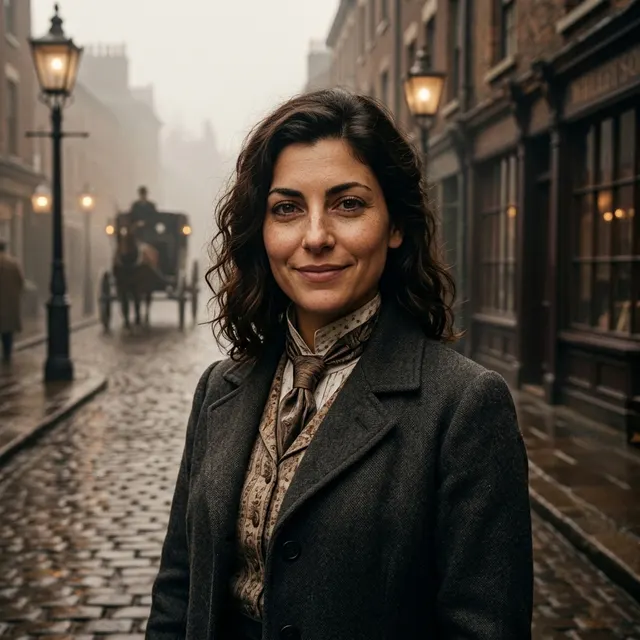
AI example Original → result
Your result may vary.
AI-generated example from an existing reference. Your result will vary.
What to expect
This is an imagined costume portrait, not a historical photograph, a documented visit or an exact reconstruction of a real location. The model changes pose, clothing, hair and facial details; likeness and historical costume accuracy are not guaranteed. There is no animation, group portrait or editable costume layer. Only one fictional adult square example has been reviewed; other subjects and frames remain unverified.
About Victorian Street Portrait
- You bring
- One clear photo of one fully clothed adult
- You get
- One fictional Victorian street portrait JPEG
The square example shows a dark wavy-haired adult in a charcoal wool overcoat, patterned high-collar shirt and necktie. Warm gas lamps line a wet cobblestone street with brick shopfronts and a softly blurred horse-drawn carriage in the mist. The face stays prominent, with the hands outside the crop and muted brown-grey photographic tones.
Compare another direction: Western Portrait · Rainy Cafe Portrait.
Before choosing a reference, learn how to choose a photo for AI art. Match the photo to this effect’s input instructions and check details before saving.
How to create with Victorian Street Portrait.
- 01
Choose one adult portrait
Upload a clear solo adult photo you have permission to edit. Keep the face unobstructed; the recipe supplies the clothing and street rather than combining multiple people.
- 02
Prepare your period scene
The style asks for a dark wool coat, high collar, foggy cobblestones, gas lamps and a small distant carriage. More options accepts an optional note and square, portrait or landscape shape. Sign in if needed, review the displayed allowance, then explicitly choose Create.
- 03
Inspect and download the still
Check the face, clothing edges, street perspective and background for unwanted lettering before saving. You receive one flattened JPEG; the mist, lamps and carriage do not animate.
Ways to use this style.
- Explore a period-costume profile portrait
- Make a fictional character portrait for a personal story mood board
Common questions.
Is this a real historical photograph?
No. It is a fictional AI costume scene inspired by a late-Victorian street. It does not document a real event or recreate a verified historical location.
Do I need a coat or a costume in my photo?
No. Start with one clear adult portrait. The recipe imagines the wool coat, high collar and street around your visual reference.
Will my face and hairstyle stay exactly the same?
The reference guides the adult likeness, hair and skin tone, but the model redraws the scene. Expression, pose, facial details and clothing can change; review the result before sharing.
Can it make the carriage move or create a group?
This preset makes one still JPEG with one main adult. It does not animate the scene or assemble separate people into a group portrait.
What does a generation include?
One generation creates one JPEG image. Photo packs start at $4.99 for 10 generations. Choose square, portrait or landscape. Another version uses another generation. A confirmed failed or blocked creation returns its reserved allowance.
Are my photos public?
Your photos and results are private to your account. They are processed to create and safety-check your image, and are not published in a public gallery. Read our privacy page for service providers and retention details.