Turn your photo into a disco mirror portrait
Turn one adult photo into a sculptural disco mirror portrait with silver tiles and colorful studio reflections. One still AI image; likeness and details may vary.
Start with a photo. Sign in when you’re ready to create.
Go to photo field
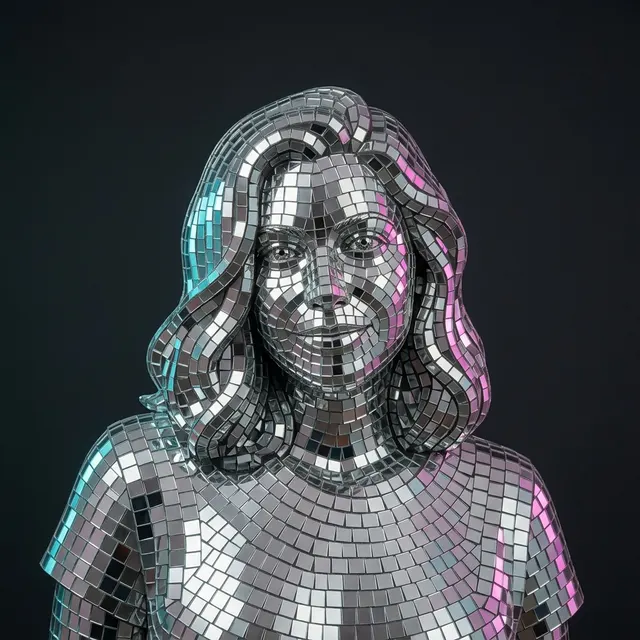
AI example Original → result
Your result may vary.
AI-generated example from an existing reference. Your result will vary.
What to expect
The model redraws the face, hair, pose and clothing as an imagined reflective surface. Exact likeness, individual tile placement and physical mirror geometry are not guaranteed. This is one static JPEG, not animation, a manufactured sculpture, a 3D model, editable mosaic tiles or a craft-cutting pattern. Only the square fictional-adult example has been checked; other inputs and shapes remain unverified.
About Disco Mirror Portrait
- You bring
- One clear solo adult portrait with permission to edit
- You get
- One still JPEG of a sculptural portrait covered in silver mirror tiles
The square example shows a silver tiled, shoulders-up likeness on a dark charcoal backdrop. Curved rows of reflective tiles describe the face, longer wavy hair and clothed shoulder outline, with cyan highlights on the left and magenta on the right.
Compare another direction: Photo × Geometry · Black and White Studio · Street Mural Portrait.
Before choosing a reference, learn how to choose a photo for AI art. Match the photo to this effect’s input instructions and check details before saving.
How to create with Disco Mirror Portrait.
- 01
Choose your solo portrait
Upload one adult photo with the face and shoulder outline visible. The recipe transforms one person; it does not assemble a group or combine multiple reference images.
- 02
Prepare the reflective look
This direction supplies silver mirror tiles, a charcoal studio background and colored side highlights. More options accepts an optional note and square, portrait or landscape shape. Sign in if needed, check the displayed allowance, then explicitly choose Create.
- 03
Inspect and download the image
Check eyes, mouth, hair silhouette, tile seams and the shoulder crop before saving the JPEG. A new version needs another generation; the file is a finished flat image rather than an editable sculpture.
Ways to use this style.
- A reflective disco-themed profile image
- A digital party portrait for a personal invitation
- A metallic-material portrait mood board
Common questions.
Does this make a physical sculpture or an animation?
No. You receive one still JPEG showing an imagined mirror-tile material. There is no moving light, 3D export, fabrication service or individual tile editor.
Will the original face and hairstyle stay exact?
The recipe asks for a recognizable likeness and silhouette, but the surface is generated anew. Facial details, hair length, expression and pose can change, as the published example demonstrates.
Is this a portrait holding a disco ball?
No. The intended effect makes the visible subject itself appear tiled and reflective, against a simple studio backdrop. Extra objects are not part of the preset.
How is this different from Photo Geometry Poster?
Photo Geometry compares a photo-like view with a simplified graphic interpretation. Disco Mirror creates one continuous sculptural portrait; Black and White Studio instead aims for a photographic monochrome lighting treatment.
What does a generation include?
One generation creates one JPEG image. Photo packs start at $4.99 for 10 generations. Choose square, portrait or landscape. Another version uses another generation. A confirmed failed or blocked creation returns its reserved allowance.
Are my photos public?
Your photos and results are private to your account. They are processed to create and safety-check your image, and are not published in a public gallery. Read our privacy page for service providers and retention details.