Turn your photo into a street mural portrait
Imagine your portrait as an original giant mural on a brick wall. Upload one clear adult photo to create one AI street scene; painted likeness and details may vary.
Start with a photo. Sign in when you’re ready to create.
Go to photo field
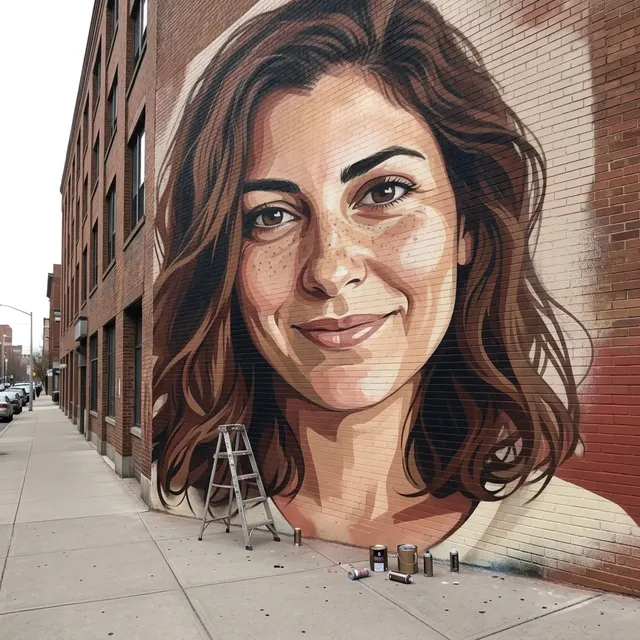
AI example Original → result
Your result may vary.
AI-generated example from an existing reference. Your result will vary.
What to expect
An imagined AI street scene, not proof that a real mural was painted or permission to use a real building. Facial likeness, hair, paint texture, facade, scale and framing may vary; the example is an angled close view, not a measured full-building rendering. No exact address, existing-artist style, wall upload, mural installation, vector layers or animation is offered. Only the square fictional-adult example has been checked; other inputs and shapes remain unverified.
About Street Mural Portrait
- You bring
- One clear solo adult portrait with permission to edit
- You get
- One still JPEG imagining an adult portrait painted at mural scale on a brick wall
The square example places a warm-toned painted adult face and shoulders across an angled brick facade. Brick courses remain visible through the portrait; a small metal ladder and several paint containers sit on the sidewalk below the close-framed mural.
Compare another direction: Pop Art · Watercolor · Disco Mirror Portrait · Photo × Geometry.
Before choosing a reference, learn how to choose a photo for AI art. Match the photo to this effect’s input instructions and check details before saving.
How to create with Street Mural Portrait.
- 01
Choose your adult portrait
Upload one clear solo adult photo with readable facial features. The recipe uses that person as the painted subject, rather than adding a second person in front of the wall.
- 02
Prepare the painted-wall scene
This direction supplies an original mural interpretation, brick wall, sidewalk, small ladder and paint cans. More options accepts an optional note and square, portrait or landscape shape. Sign in if needed, check the displayed allowance, then explicitly choose Create.
- 03
Inspect the paint and street perspective
Check the face, painted edges, brick texture, ladder and building perspective before downloading the JPEG. Another version uses another generation; the saved image does not contain editable paint layers.
Ways to use this style.
- A fictional street-art portrait for a personal post
- A painted-wall profile image
- A visual mood board for a portrait mural concept
Common questions.
Will this create a real mural on a real building?
No. The result is a fictional street photograph generated as one JPEG. It is not a commissioned painting, installation service, building approval or record of completed work.
Can I upload a specific wall or choose an artist?
This recipe takes one adult portrait and invents the wall. There is no second wall-photo input, exact landmark selector or existing-artist style option.
Will the full wall and exact face always fit?
No. The direction asks for mural scale, but framing, building perspective, hair and facial detail can change. The published example crops closely around the painted portrait.
How is it different from Pop Art or Watercolor?
Pop Art redraws the portrait as a flat graphic with bold shapes. Watercolor aims for a painted-paper finish. Street Mural shows a painted likeness on brick within an imagined street scene.
What does a generation include?
One generation creates one JPEG image. Photo packs start at $4.99 for 10 generations. Choose square, portrait or landscape. Another version uses another generation. A confirmed failed or blocked creation returns its reserved allowance.
Are my photos public?
Your photos and results are private to your account. They are processed to create and safety-check your image, and are not published in a public gallery. Read our privacy page for service providers and retention details.