AI White Background Photo from One Picture
Turn one clear photo into an AI image with a clean white backdrop. Download one JPEG; facial and edge details may vary. Not a transparent cutout or passport photo.
Start with a photo. Sign in when you’re ready to create.
Go to photo field
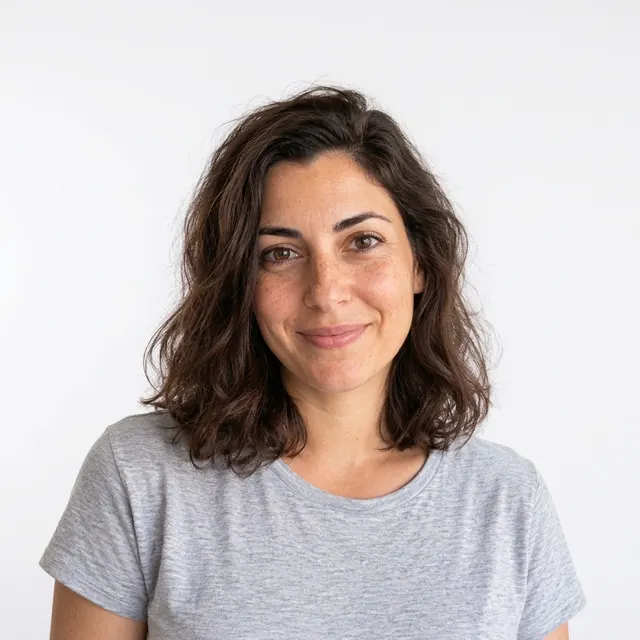
AI example Original → result
Your result may vary.
AI-generated example from an existing reference. Your result will vary.
What to expect
This is an AI redraw with an opaque white backdrop, not a transparent PNG cutout, exact background mask or pixel-preserving edit. Facial details, hair edges, clothes, shadows and framing can change. It does not certify passport, identity-document or marketplace requirements. Only one fictional adult square example is reviewed; products, pets, groups and other frames remain unverified.
About AI White Background Photo
- You bring
- One clear photo of one fully clothed adult
- You get
- One AI JPEG portrait against a clean white backdrop
The fictional adult has dark wavy shoulder-length hair and a grey T-shirt against a near-white backdrop. The face, pose and framing remain similar to the original pale-grey-wall portrait; fine hair, facial and fabric details are redrawn.
Compare another direction: Pastel Pink Hair Preview · Black and White Studio.
Before choosing a reference, learn how to choose a photo for AI art. Match the photo to this effect’s input instructions and check details before saving.
How to create with AI White Background Photo.
- 01
Choose one adult photo
Choose one clear adult photo you have permission to edit. Keep the face, hair and desired body area inside the original frame.
- 02
Prepare your white-backdrop image
The style asks for a plain white backdrop while retaining the person and clothes. More options lets you add a note and choose square, portrait or landscape. Sign in if needed, review the displayed allowance, then explicitly choose Create.
- 03
Inspect edges and likeness
Compare the face, hairstyle, clothes and framing with your original. Inspect hair edges and shadows before downloading the single JPEG.
Ways to use this style.
- Explore a simple white-background profile image
- Prepare an informal portrait mood board with fewer background distractions
Common questions.
Do I get a transparent cutout?
No. You receive one flattened JPEG with an opaque white backdrop, not a transparent PNG or editable mask.
Will the person and clothes remain identical?
The prompt asks to keep them closely aligned, but the image is redrawn by AI. Compare likeness, hair edges, garment details and framing against your original.
Is this suitable for an official document photo?
No compliance is promised. Passport and identity-photo rules differ; this recipe is an informal AI interpretation, not an approved document-photo service.
What does a generation include?
One generation creates one JPEG image. Photo packs start at $4.99 for 10 generations. Choose square, portrait or landscape. Another version uses another generation. A confirmed failed or blocked creation returns its reserved allowance.
Are my photos public?
Your photos and results are private to your account. They are processed to create and safety-check your image, and are not published in a public gallery. Read our privacy page for service providers and retention details.