AI Pastel Pink Hair Preview from Your Photo
See a soft pink hair look from one adult photo. Create one AI image while trying to retain your hairstyle and scene. Results vary; not a salon colour prediction.
Start with a photo. Sign in when you’re ready to create.
Go to photo field
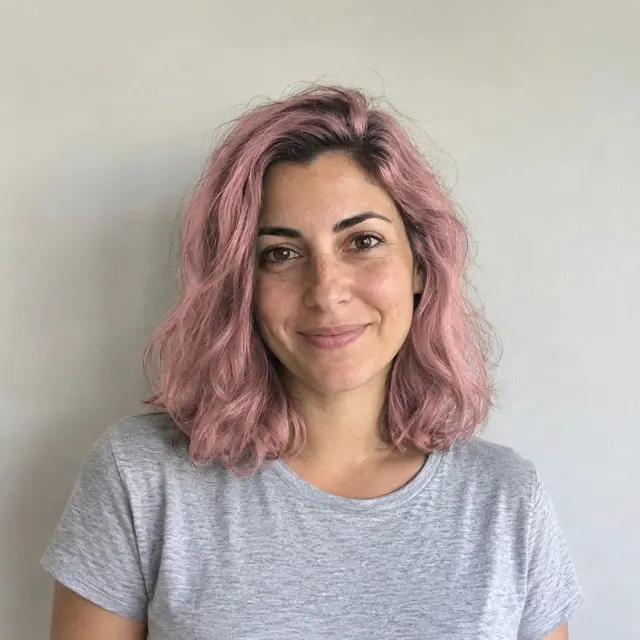
AI example Original → result
Your result may vary.
AI-generated example from an existing reference. Your result will vary.
What to expect
This is an imagined AI hair-colour preview, not a salon dye prediction, exact shade match or pixel-preserving recolour. Natural hair colour, lighting, bleaching and dye chemistry are not simulated. Hairstyle, hairline, facial details, clothing and background may change. Only one fictional adult with shoulder-length dark hair has been reviewed; other hair types, group photos and output shapes remain unverified.
About Pastel Pink Hair Preview
- You bring
- One clear adult portrait with visible hair
- You get
- One AI portrait JPEG imagining soft pastel-pink hair
The fictional adult has muted pink shoulder-length wavy hair with darker roots, a grey T-shirt and a pale grey wall background. Compared with the original dark-haired portrait, the overall pose and framing remain similar; individual strands and fine facial details differ.
Compare another direction: Gender Swap · Black and White Studio · AI White Background Photo.
Before choosing a reference, learn how to choose a photo for AI art. Match the photo to this effect’s input instructions and check details before saving.
How to create with Pastel Pink Hair Preview.
- 01
Choose one adult photo
Choose one adult photo you have permission to edit. Show the hair clearly, including the roots and ends; avoid hats or hair hidden outside the frame.
- 02
Prepare your preview
The style supplies the soft pink-hair direction. More options lets you add a note and choose square, portrait or landscape. Sign in if needed, review the displayed allowance, then explicitly choose Create.
- 03
Check the whole portrait
Inspect the hairline, roots, strands and ends, then compare the face, eyebrows, shirt and background with your original before downloading the single JPEG.
Ways to use this style.
- Explore a gentle pink-hair look for a personal mood board
- Compare an imagined hair-colour direction before discussing it with a stylist
Common questions.
Does this predict how pink dye will look on my hair?
No. It imagines a colour direction in an AI image. It does not model your hair condition, bleaching, dye formula or salon outcome.
Will everything except hair stay exactly the same?
The prompt asks to retain the hairstyle, face, outfit and scene, but this is an AI redraw. Review every part against the original; there is no identity or pixel lock.
What do I download?
One finished JPEG portrait. It is not an editable hair mask, layered file or original-and-result comparison panel.
What does a generation include?
One generation creates one JPEG image. Photo packs start at $4.99 for 10 generations. Choose square, portrait or landscape. Another version uses another generation. A confirmed failed or blocked creation returns its reserved allowance.
Are my photos public?
Your photos and results are private to your account. They are processed to create and safety-check your image, and are not published in a public gallery. Read our privacy page for service providers and retention details.