AI Cyanotype Photo Effect on Textured Paper
Create a cyanotype-inspired digital artwork from one photo, with deep blue tones, pale highlights and a brushed paper border. AI restyling can change facial details, textures and small objects. The result is one JPEG of imagined paper art, not an exact blue filter, transparent negative or physical product.
Start with a photo. Sign in when you’re ready to create.
Go to photo field
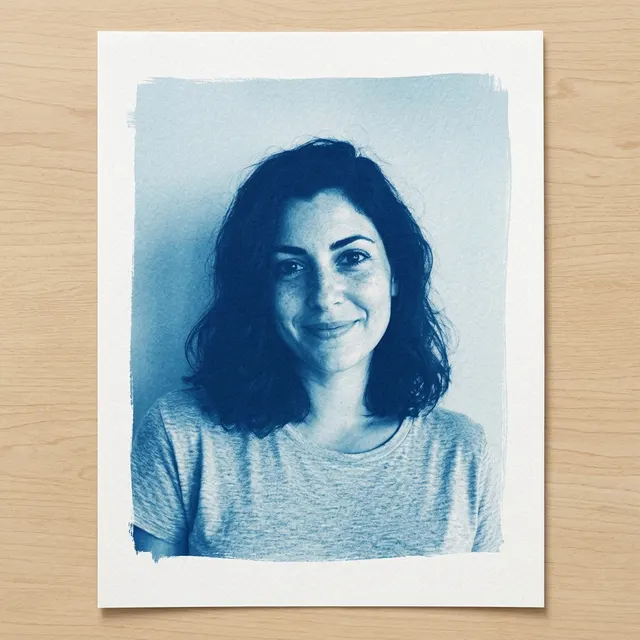
AI example Original → result
Your result may vary.
AI-generated example from an existing reference. Your result will vary.
What to expect
Facial likeness, scene details, fine patterns and tones can change. The paper, brushed border and tabletop are AI-created. This is one digital JPEG, not a physical print, chemical sun-printing process, transparent cutout, layered design or exact color conversion. The published example is one fictional adult in a square image; other subjects and shapes have not been reviewed.
About Cyanotype Sun Print
- You bring
- One clear photo with a readable main subject
- You get
- One blue-and-white cyanotype-style JPEG showing a digital print on textured paper
The example shows a fictional adult with shoulder-length dark hair and a light shirt, rendered in deep blue and pale cyan with white highlights, on a brushed-edge paper sheet resting on a pale wood tabletop.
Compare another direction: Paper Scrapbook Portrait · Black and White Studio.
Choose the right cyanotype-style result
This effect imagines a blue-and-white print on textured paper. The published example is one fictional adult portrait; other subjects and shapes have not been reviewed.
For the same pixels recolored with repeatable contrast controls, choose a conventional photo filter. This AI effect can change facial features, lettering and fine patterns. It is not a calibrated negative-making tool for physical cyanotype printing.
Need to preserve exact details? Compare photo filters and AI restyling before choosing a method.
Before choosing a reference, learn how to choose a photo for AI art. Match the photo to this effect’s input instructions and check details before saving.
How to create with Cyanotype Sun Print.
- 01
Choose your photo
Choose one clear photo with a readable main subject and some light-and-dark contrast. The recipe restyles that one image on an imagined sheet of paper; a real paper print is not required.
- 02
Prepare and create
The selected style supplies the blue-and-white paper-art direction. More options lets you add a note and choose square, portrait or landscape. Sign in if needed, review the displayed allowance, then explicitly choose Create.
- 03
Check and download
Inspect the subject, tonal contrast, paper margin and brushed image edges before saving the JPEG.
Ways to use this style.
- A blue-toned personal portrait to keep or share
- A digital paper-art image for a personal moodboard
- A single-photo study in blue shadows and white highlights
Common questions.
What kind of photo should I use?
Choose one sharp photo with a clear main subject and some contrast between light and dark areas. The model uses the image as a visual reference. The reviewed example is a fictional adult portrait; other subjects have not been tested for this recipe.
Is this a real cyanotype or a printed product?
No. It is an AI-created JPEG that simulates a blue-and-white print and paper texture. No chemicals, sun exposure, paper delivery or physical printing are included.
Does it preserve every detail or provide an exact blue filter?
No. The model redraws the photo rather than applying a deterministic color filter. Faces, fine patterns, tones, edges and arrangement may vary; inspect the full result.
How is it different from Paper Scrapbook or Black and White Studio?
Paper Scrapbook builds a decorated paper composition, and Black and White Studio changes portrait lighting in neutral monochrome. Cyanotype uses blue shadows, white highlights and one brush-edged simulated print. It returns one still image, not an editable paper layout.
What does a generation include?
One generation creates one JPEG image. Photo packs start at $4.99 for 10 generations. Choose square, portrait or landscape. Another version uses another generation. A confirmed failed or blocked creation returns its reserved allowance.
Are my photos public?
Your photos and results are private to your account. They are processed to create and safety-check your image, and are not published in a public gallery. Read our privacy page for service providers and retention details.