Turn your face photo into a glowing pumpkin
Create a glowing carved-pumpkin portrait from one face photo. A decorative AI Halloween image, not a printable stencil; facial details may vary.
Start with a photo. Sign in when you’re ready to create.
Go to photo field
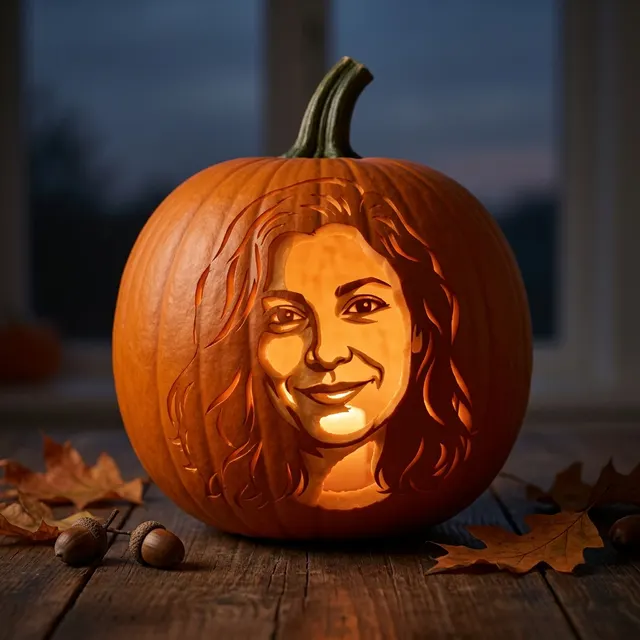
AI example Original → result
Your result may vary.
AI-generated example from an existing reference. Your result will vary.
What to expect
This is an AI interpretation on a curved pumpkin surface, not exact facial preservation, a physical pumpkin or a printable cutting stencil. The image supplies no scale, cutting bridges or editable layers. Glow, facial details, small props and composition may vary. The published example is one square result from a fictional adult; other photos and shapes have not been checked for this recipe.
About Glowing Pumpkin Portrait
- You bring
- One clear adult face photo you have permission to edit
- You get
- One decorative JPEG of a glowing pumpkin with a carved facial likeness
The square example shows a smiling, long-haired carved likeness glowing inside one orange pumpkin. Its stem remains visible above a wooden tabletop with dry leaves and a few acorns.
Compare another direction: Halloween Portrait · Paper Cut · Haunted Mirror Portrait · Flying Witch Portrait.
Need to preserve exact details? Compare photo filters and AI restyling before choosing a method.
Before choosing a reference, learn how to choose a photo for AI art. Match the photo to this effect’s input instructions and check details before saving.
How to create with Glowing Pumpkin Portrait.
- 01
Choose a face photo
Upload one clear photo of one adult. Keep the main facial features visible; this recipe translates them into pumpkin cutouts and shaded orange skin.
- 02
Prepare the glowing scene
The recipe supplies the pumpkin, warm inner light and autumn tabletop. More options accepts an optional note and square, portrait or landscape shape. Sign in if needed, check the displayed allowance, then explicitly choose Create.
- 03
Review and save the still image
Check the carved face, stem, glowing edges and surrounding props before downloading the JPEG. This is a decorative picture, not a measured carving plan; another version uses another generation.
Ways to use this style.
- A Halloween profile picture with a carved face instead of a costume
- A personal autumn greeting image to share digitally
- A decorative portrait illustration for a digital party invitation
Common questions.
Can I print this as a pumpkin-carving stencil?
No. The result is a lit decorative pumpkin image with shadows and curved surfaces, not a technical pattern. It has no measured scale or cutting bridges.
Does it make a carving animation or a person in a pumpkin costume?
No. It creates one still JPEG of a pumpkin with a carved face. Halloween Portrait is the separate adult costume-and-scene task.
Will every facial detail match my photo?
The face guides an artistic carved likeness, but eyes, smile, hair silhouette and proportions may change. Review the result before using it; only the fictional adult square example is shown here.
What does a generation include?
One generation creates one JPEG image. Photo packs start at $4.99 for 10 generations. Choose square, portrait or landscape. Another version uses another generation. A confirmed failed or blocked creation returns its reserved allowance.
Are my photos public?
Your photos and results are private to your account. They are processed to create and safety-check your image, and are not published in a public gallery. Read our privacy page for service providers and retention details.